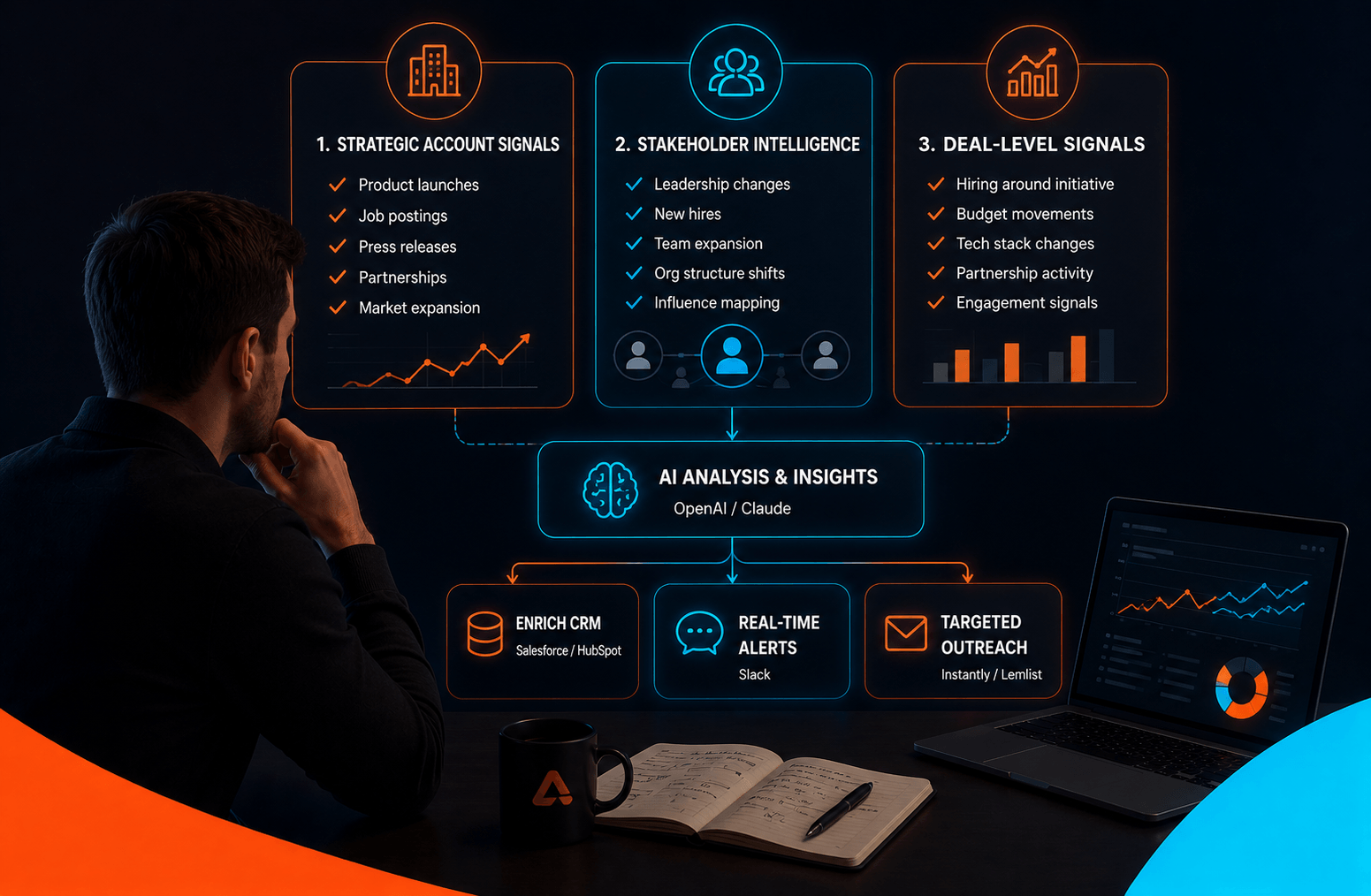

🔑 What Are SDR-Agents?
“SDR-Agent” is a term we at Peakora started to use to describe fully automated workflows that identify an intent signal from a potential buyer, enrich the data, and directly send a personalised and relevant message over email and/or LinkedIn to the person.
These agents can i.e. monitor job changes, new hires, or job postings to identify companies that are expanding or restructuring and thus show strong indicators of potential sales opportunities.
What sets SDR-Agents apart is their ability to not only automate lead qualification and meeting scheduling, but also personalize outreach. By leveraging intent data, these agents craft highly tailored messaging that addresses the specific pain points and needs of each prospect. Whether it’s offering a solution for a new team in need of tools or addressing challenges arising from recent organizational changes, the messaging is always spot-on and timely.
By automating repetitive tasks and delivering personalized communication, SDR-Agents ensure your pipeline stays full of high-quality, sales-ready leads—all while freeing up your team to focus on building relationships and closing deals.
What was done with 10 SDRs in the past, can now be fully automated.
1. SDR-Agent: Job Change Tracking of Champions
What It Does: Tracks when champions within your client base change jobs, giving you an opportunity to reconnect— increasing the chances of selling your product/service again to the same person but in a new account.
How to Set It Up:
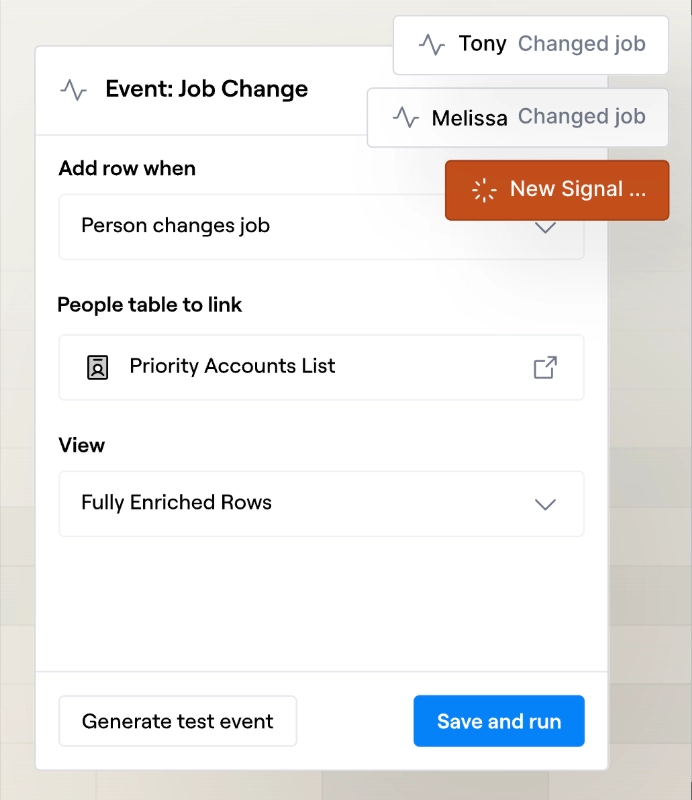
- Measure the Signal: There are dedicated tools that automatically track job changes. Previously, you would receive notifications on Sales Navigator when such events occurred; now, you can set this up directly in a tool like Clay (see screenshot below).
- Enrich the Data: What’s great about Clay is that it’s a powerful data enrichment platform at its core. Connected to 100+ data providers, including AI providers like OpenAI (ChatGPT) and Anthropic (Claude), it can (almost) find and compute any kind of data—such as the company's industry or the scope of the person's new role.
- Filter for Further Qualification: Once the data is enriched, use it to determine whether the company the person joined fits your target segment. There’s no point in reaching out if there’s no potential opportunity in the first place!
- Targeted Outreach: Once identified, use AI in Clay to craft a personalized email that acknowledges the job change. You can then push the lead and the AI-generated messaging directly to your outbound tool, like SmartLead or Lemlist. The contact is automatically enrolled in a campaign, welcoming them to their new role and offering assistance.
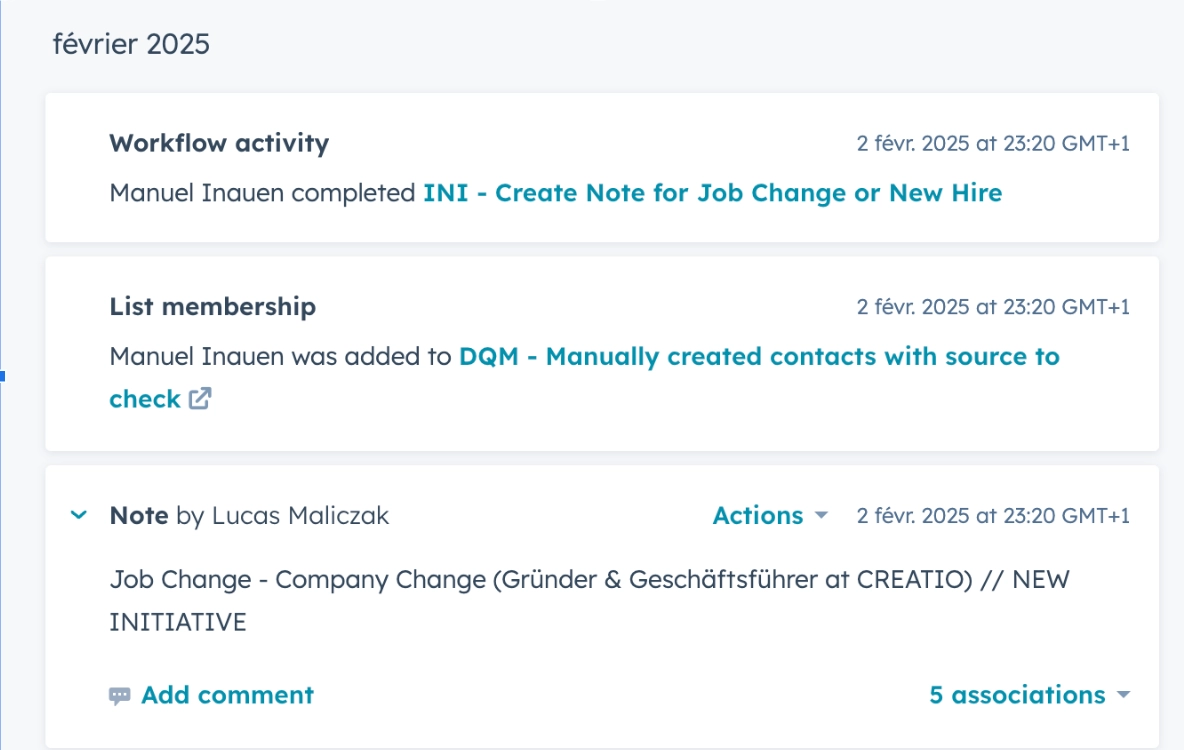
- Log This Event in Your CRM: As your single source of truth, your CRM should be where you log key signals such as job changes.
💡 TIP: Leverage the “reconnect” angle by emphasizing that they’ve worked with you before or previously shown interest in your service.
❗ EXAMPLE: A prospect moves to a new company, and AI sends them an email saying, “Congrats on the new role! Are you planning to have the same impact at your new company as you did in your last one? Let’s chat about how we can help you achieve that again.”
Below is a screenshot from Clay illustrating how to implement job change signals for your champions.
In the screenshot below, you can see how a workflow activity is triggered to generate an automatic note in your CRM.
2. SDR-Agent: New Hire Tracking
What It Does: Tracks new hires of buyer personas within your target accounts for timely outreach—allowing you to present yourself at the right time to help them plan and achieve their first objectives.
How to Set It Up:
- Set Filters for Ideal Roles: An efficient way to monitor new hires is by leveraging Sales Navigator. Start by building a list of filters to show only people hired under the personas of interest. Experiment with job title filters and other criteria such as company headcount or industry.
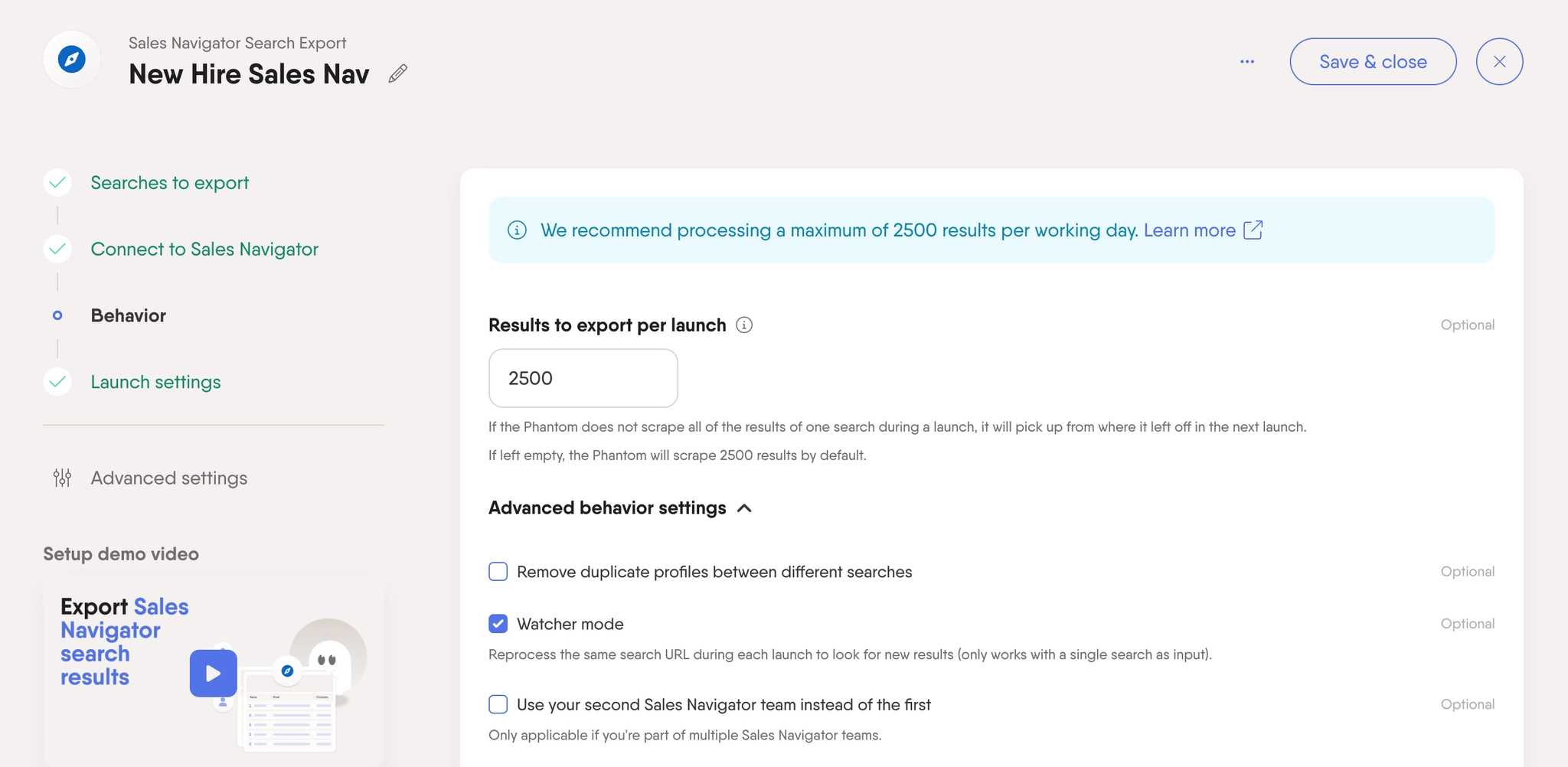
- Monitor on Phantombuster: Once you’re satisfied with your filters, save your search on Sales Navigator by copying its URL. Then, go to Phantombuster and set up the Sales Navigator List Export automation. Paste the saved Sales Navigator search URL and configure the settings to monitor this list in Watcher Mode, running the automation regularly (typically daily).
- Push the New Records to Clay: Set up a Clay Table to receive all new contacts from Phantombuster and start enriching the data with additional information to determine if the person fits your ICP (you can leverage AI for this analysis). Feel free to enrich the data further and push the leads to your CRM afterward.
- Targeted Outreach: Finally, leverage AI to craft personalized messaging based on the company’s recent activities and the new hire’s role and scope. Push the leads to your outbound tool for outreach.
💡 TIP: New hires are often eager to make an impact—position your outreach as a tool that helps them achieve their goals faster.
❗ EXAMPLE: A newly hired Sales Manager at a tech company starts their role. AI sends them an email with resources on how they can best build their pipeline (while naturally positioning your offering).
In the screenshot below, you can see how we configure the filter in LinkedIn Sales Navigator to track individuals who have recently started a new role within our ICP and buyer personas.


3. SDR-Agent: Job Offers & Hiring Signals
What It Does: Monitors job offers posted by your target companies to identify signals of a need that your service can fulfil.
🔥 BONUS: sometimes the company’s current challenges or objectives are mentioned in the job description!
How to Set It Up:
- Job Listing Tools: Use platforms like Glassdoor, LinkedIn, or industry-specific job boards to track job postings.
- AI Analysis: Scrape them and push them to Clay, use Clay to analyze the job description and identify the challenges the company is currently facing.
- Qualify for fit: Qualify for ICP, and enrich the needed company and contact information in Clay
- Tailored Outreach: Create personalized outreach with AI-messaging in Clay based on the job description’s key pain points (e.g., “It looks like you’re hiring for a new Sales Operations Manager. We can help streamline your sales processes.”). Enroll them in a sequence in SmartLead with a direct integration between Clay and SmartLead.
💡 TIP: Focus on high-level roles and growth companies—these are most likely to have budget and authority to make decisions.
❗ EXAMPLE: A company posts a job for a Sales Operations Manager. The AI analyzes the job description and crafts a tailored email explaining how your product solves the problems they mention.
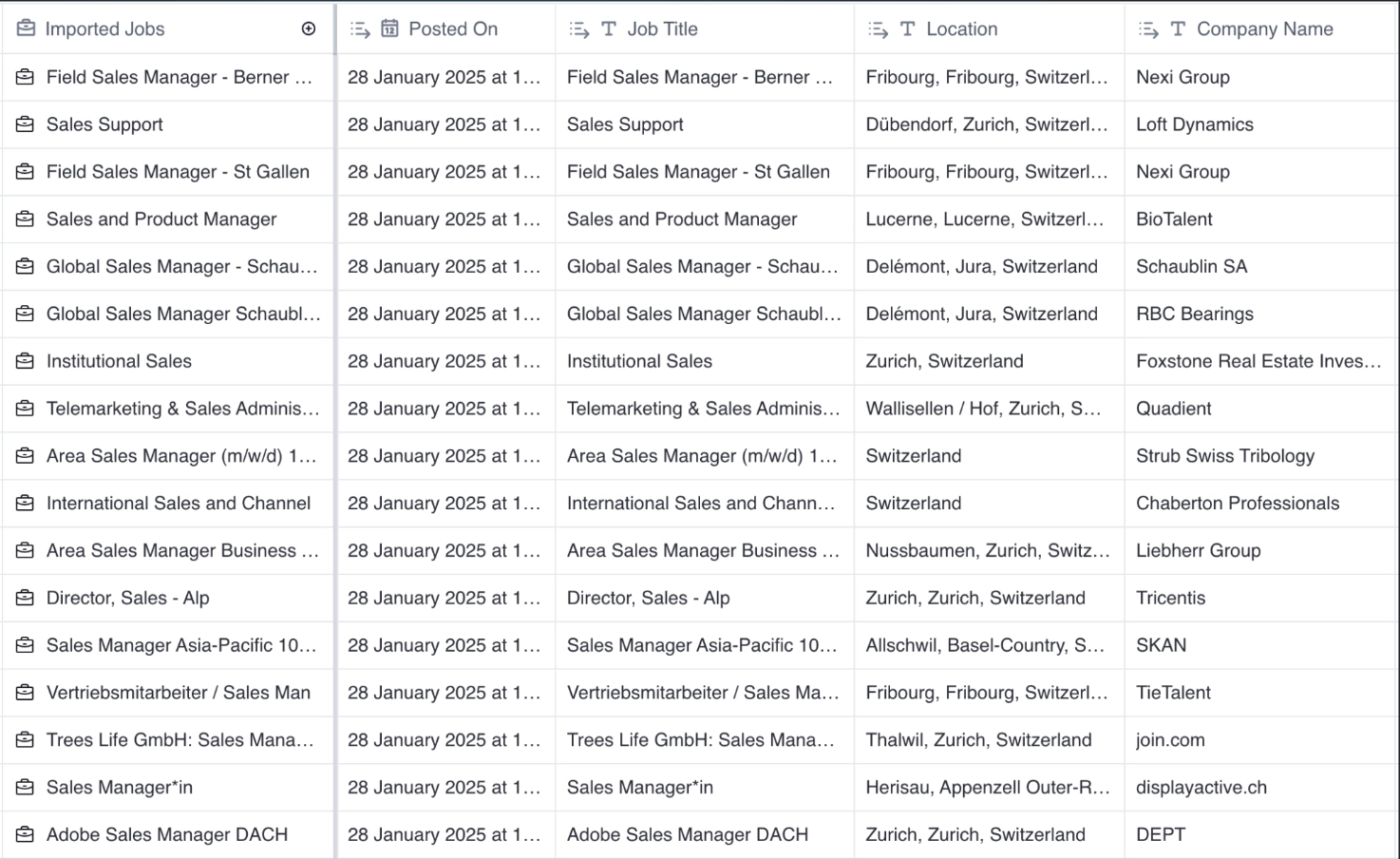
In the screenshot below, you can see our Clay template, where we scraped all open job positions within our Buyer Personas and ICPs and enriched the relevant information to set up a targeted outreach.
📈 Why SDR-Agents Will Transform Your Prospecting Process
SDR-Agents are more than just automation tools—they’re intelligent prospecting assistants that detect intent signals, engage leads at the right moment, and streamline outreach. By leveraging job changes, new hires, and job postings, SDR-Agents help identify companies actively expanding or restructuring, making them prime candidates for your solution.
With SDR-Agents handling lead qualification, outreach, and follow-ups, your team can focus on high-value conversations and closing deals instead of tedious manual tasks. The result? A faster, more efficient, and scalable outbound prospecting process that fills your pipeline with high-quality, intent-driven leads—month after month.
🌟 Final Tip: Start Small, Scale Fast!
Start by implementing one or two AI-powered SDR-Agents to automate repetitive tasks. Once you see the impact, gradually scale and integrate more agents into your workflow. The key to success is in continuous improvement—refining the SDR-agents as you go.
Ready to get started?
In this session, we will:
- Identify your known and unknown challenges that hinder you from growing your business.
- Get solutions to your problems from GTM experts who’ve scaled high-growth B2B companies.
- Develop a 3-Step action plan that will get you results over the next 90 days.